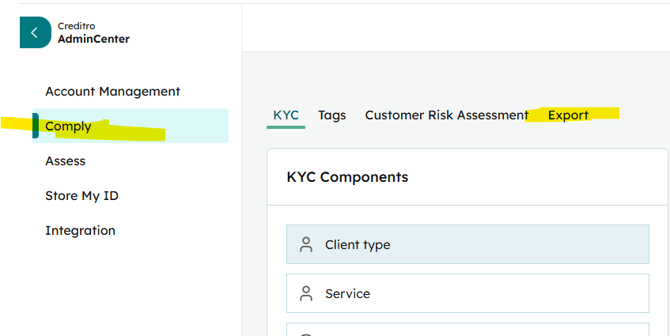
This article explains how to export customer and client lists from Creditro, which export formats are available, and how to enable full AML export access. The Service is a paid option.
How to export customer lists
- Open Settings (admin center - small wheel) in the Creditro web app.
- In the left menu, select Comply.
- Choose Export.
- Download the exported file (Excel format is available).
What you can export
- Excel file with all customers and their assigned client-responsible persons (client managers).
- Lists suitable for reporting on customers and client assignments.
If you dont have it already, then we need to Enable the AML exports (The serivce is a paid option)
- The service of AML-export feature is available for purchase.
- Price: 2,500 DKK per year.
- With AML-export enabled you can pull lists.
Practical tips
- If the Export option does not appear, refresh the page and check again.
- Exports can be used to produce overviews of customers and their assigned client managers.
Support and data corrections
- If you need to correct customer data (for example, a misspelled name), support can make corrections on the record.
Conclusion Use Settings → Comply → Export to obtain Excel exports of customers and client-responsible assignments. If you dont have it already enabled then the the AML-export add-on at 2,500 DKK/year. If an export option is not visible, refresh the page or contact support for assistance. Remember that this requires admin rights to access the settings.
If you have purchased access to the AML export function, you have the option to pull a full list of your cases. You do this in the settings, which you find by clicking on the gear wheel at the bottom of the left column. Then select "Comply" and then "Export". Remember that this requires admin rights to access the settings.